Introduction
Excel did not become the backbone of business operations by accident. It is flexible, familiar, and easy to start with. For early-stage teams, it feels like the fastest way to track data, manage processes, and keep work moving without heavy investment.
Here is the challenge.
The same tool that helps a business get started often becomes the reason it struggles to grow.
As companies scale, Excel turns into a web of disconnected files, manual updates, and fragile workflows. Data exists in multiple versions. Reports take hours or even days to prepare. Small errors quietly grow into larger operational issues. Decisions are delayed or made using outdated information.
Most businesses sense this problem long before they can clearly explain it. They know Excel is slowing them down, but they are unsure what should replace it, when the switch makes sense, or whether an ERP system is actually necessary.
This article clears that confusion.
You will understand why companies continue to rely on manual Excel sheets, where Excel starts failing in real business operations, and how an ERP system helps automate processes and support growth without disrupting daily work. By the end, you should be able to assess whether your business is ready to move beyond Excel and what that transition should realistically look like.
When Should a Business Move from Excel to ERP?
A business should move from Excel to ERP when multiple teams rely on the same data, reports take significant time to prepare, errors are discovered after decisions are made, and leadership lacks real-time visibility. These are system-level requirements that spreadsheets cannot reliably support as operations grow.
Why Many Companies Still Depend on Manual Excel Sheets
Excel remains central to many businesses because it solves problems quickly with almost no setup. It is already available, most people know how to use it, and it feels flexible enough to manage everything from sales tracking to expense reporting.
Familiarity plays a major role. Teams trust spreadsheets because they can see and edit everything directly. This creates a sense of control, even when processes depend heavily on manual effort.
Excel also works reasonably well in the early stages of a business. With limited data, few users, and simple workflows, spreadsheets feel efficient and manageable.
The problem is that businesses grow, but Excel does not evolve with them.
As operations expand, more sheets are added, files are shared across teams, and multiple versions begin circulating. What once felt simple slowly becomes difficult to manage and increasingly fragile.
Most companies do not stay with Excel because it is ideal. They stay with it because it is familiar, easy to start, and does not force them to rethink how their processes should actually work.
Where Manual Excel Systems Start Breaking Down
Excel begins to fail when business operations become interconnected. What works for a single task breaks down when multiple teams depend on shared data.
One of the first issues is data duplication. The same information exists across multiple sheets owned by different people. A small update in one file does not reflect everywhere else. Over time, no one is certain which version is accurate.
Human error follows closely. Manual entries, copied formulas, and accidental deletions are difficult to detect and easy to repeat. Excel offers limited safeguards, so mistakes often surface only after reports are reviewed or decisions have already been made.
Another major limitation is the lack of real-time visibility. Excel reports are always backward-looking. By the time data is collected, cleaned, and shared, it is already outdated. This slows decision-making and creates blind spots for leadership.
Collaboration also becomes harder. Multiple people working on shared files leads to access conflicts, broken formulas, and locked sheets. Instead of supporting teamwork, Excel becomes a bottleneck.
Security and accountability are weak as well. Anyone with access can change data intentionally or unintentionally. There is little clarity around who made changes and when, which increases operational risk as the business grows.
At this stage, Excel is no longer just inefficient. It becomes a hidden risk.
The Hidden Costs of Running Business Operations on Excel
The biggest cost of using Excel at scale is not software licensing. It is time, delays, and poor decisions that accumulate quietly.
Teams spend hours updating sheets, reconciling numbers, and checking for errors. What seems like a simple task often requires repeated verification because data exists in multiple places. This time is rarely tracked, but it directly reduces productivity.
Reporting is another hidden drain. Since Excel data is not connected in real time, reports are always prepared after the fact. By the time leadership reviews them, the reality on the ground has already changed. Decisions are made using outdated information rather than current data.
Excel also creates dependency risks. Many businesses rely on one or two individuals who understand complex spreadsheets and formulas. If those people are unavailable or leave, processes slow down or stop entirely.
As the business grows, these inefficiencies multiply. More transactions lead to more files, more manual work, and more opportunities for errors. What once appeared inexpensive becomes costly in terms of effort, delays, and missed opportunities.
These costs do not appear on a balance sheet, but they directly affect how confidently and efficiently a business can scale.
When Excel Still Makes Sense and When It Does Not
Excel is not inherently a problem. It works well when operations are simple and limited in scope.
For early-stage companies, spreadsheets are often sufficient. If data volume is low, processes are not tightly connected, and one or two people manage operations, Excel can be practical and effective.
The issue begins when Excel is treated as a long-term operating system rather than a temporary tool.
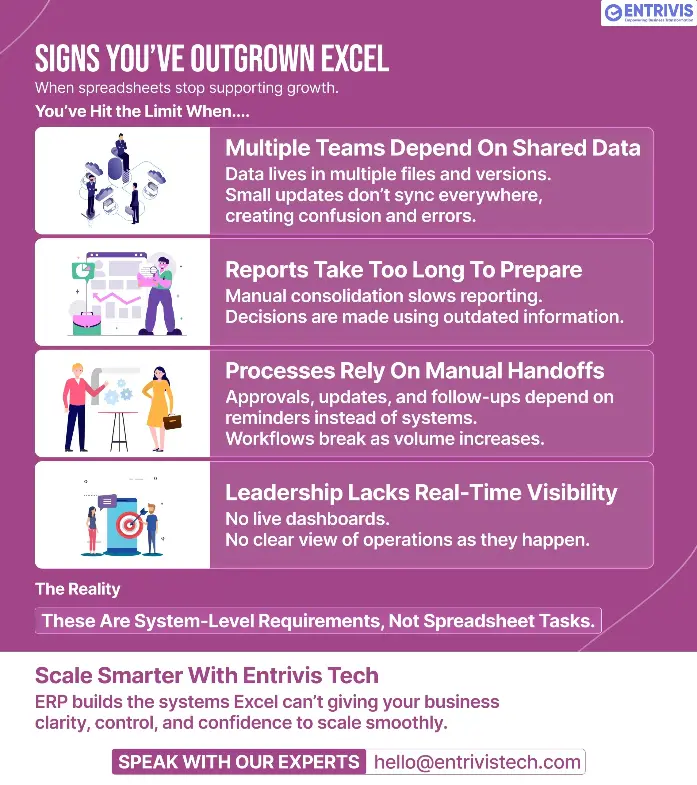
There are clear signs a business has outgrown Excel:
- Multiple teams depend on the same data
- Reports take excessive time to prepare
- Errors are discovered after decisions are made
- Processes rely on manual handoffs and reminders
- Leadership lacks real-time operational visibility
When these signs appear, Excel is no longer supporting growth. It is holding it back.
A simple way to assess readiness is this. If your business requires shared workflows, approvals, consistent data, and real-time reporting, spreadsheets will struggle to keep up. These are system-level needs, not spreadsheet tasks.
What an ERP System Actually Does Without the Jargon
An ERP system is a centralized platform that connects core business processes in one place. Instead of managing separate Excel files for each function, ERP stores data in a single shared system.
At its core, ERP replaces manual handoffs with structured workflows. When data is entered once, it becomes instantly available across departments. This reduces duplication, errors, and delays.
ERP systems also automate routine tasks. Approvals, updates, calculations, and status changes happen automatically based on predefined rules. Teams no longer need to chase files or reminders to keep work moving.
Visibility is another key difference. ERP provides real-time dashboards and reports, allowing managers to see what is happening as it happens instead of waiting for manual updates.
Access control is built in. Users see only what they need, and every change is logged. This improves security, accountability, and compliance as the business grows.
In simple terms, Excel helps manage information. ERP helps run operations.
How ERP Helps Businesses Scale and Automate Operations
ERP supports growth by turning scattered activities into structured processes. Instead of each team working in isolation, everyone operates within the same system using the same data.
Process standardization is one of the biggest advantages. ERP defines how tasks flow across departments, reducing guesswork and ensuring consistency even as teams expand.
Automation removes repetitive manual work. Routine approvals, updates, and calculations happen automatically, freeing teams to focus on higher-value activities.
Decision-making becomes faster and more reliable. Because data is updated in real time, leadership can act based on current conditions rather than assumptions or delayed reports.
Most importantly, ERP allows businesses to scale without operational chaos. New users, higher transaction volumes, and additional processes can be added without breaking existing workflows.
As complexity increases, ERP absorbs it. Excel cannot.
ERP vs Excel at a System Level
Area | Excel | ERP |
Data updates | Manual | Real-time |
Error control | Limited | Rule-based |
Collaboration | Fragile | Structured |
Visibility | Delayed | Live dashboards |
Scalability | Breaks easily | Designed to scale |
This shift from isolated spreadsheets to connected systems is what enables sustainable growth.
Moving from Excel to ERP Without Disrupting the Business
Many companies delay ERP adoption due to fear of disruption. The assumption is that everything must change at once.
In reality, successful ERP transitions are gradual.
A phased approach works best. Businesses begin by mapping existing processes and identifying areas that create the most friction. ERP is then implemented step by step rather than all at once.
Data migration does not mean copying every spreadsheet. Only clean and relevant data is moved into the system, reducing clutter and improving accuracy from the start.
Training is as important as technology. Teams need to understand how ERP fits into their daily work, not just how to use the software. When users see that ERP removes manual effort instead of adding complexity, adoption improves naturally.
With the right planning, ERP stabilizes operations instead of disrupting them.
How Entrivis Tech Helps Businesses Transition from Excel to ERP
Moving away from Excel is not just a software decision. It is a process decision. Many ERP initiatives fail because workflows are not understood before technology is introduced.
Entrivis Tech begins by studying how your business actually operates today. Existing Excel-based processes are mapped clearly before recommending any ERP solution. This ensures the system fits your operations rather than forcing unnecessary change.
Implementation follows a phased approach. High-impact areas are prioritized first so automation delivers value early without overwhelming teams.
Data migration is selective. Only accurate and useful data is moved into ERP, helping businesses avoid carrying inefficiencies forward.
Training and adoption are treated as core components of the project. Teams are guided on how ERP simplifies daily work, which improves long-term usage and success.
The objective is not simply to replace Excel. It is to build a scalable operational foundation that supports growth.
Conclusion
Excel plays an important role in helping businesses get started. It is flexible, familiar, and effective when operations are simple. As companies grow, however, manual spreadsheet-based processes struggle with scale, accuracy, and visibility.
Errors increase, reporting slows, and decision-making becomes reactive rather than proactive. These challenges are not signs of poor management. They indicate that the business has outgrown the tool.
ERP fills this gap by connecting processes, automating routine work, and providing real-time visibility across the organization. It enables growth without operational chaos.
This is where Entrivis Tech adds value. By taking a business-first approach to ERP, Entrivis Tech helps companies transition from Excel in a structured and low-risk way. The focus is not just on implementing software, but on building systems that support how the business operates and grows.
The goal is not to abandon Excel overnight. It is to transition at the right time, with a clear plan, and with a foundation designed for scale.
If your business is starting to feel limited by manual Excel processes, this is the right time to evaluate your next step.
Start with a focused discussion to understand whether ERP fits your current operations and growth plans.
Talk to the Entrivis Tech team
Frequently Asked Questions
Is ERP only meant for large enterprises?
No. ERP is valuable for small and mid-sized businesses once operations become interconnected. Business complexity matters more than company size.
Is ERP expensive compared to Excel?
Excel appears cheaper initially, but manual work, errors, and delays create hidden costs over time. ERP reduces these ongoing operational losses.
How long does it take to move from Excel to ERP?
Timelines depend on scope and approach. With phased implementation, businesses can start seeing value within weeks while continuing normal operations.
Can Excel and ERP be used together initially?
Yes. Many businesses continue using Excel for analysis while running core operations on ERP, which makes the transition smoother.