Exporting is not just selling products across borders. It is managing a chain of documents, regulations, partners, and processes that must align correctly every time. A single mistake can delay a shipment, block customs clearance, or create serious compliance risk.
Most exporters still rely on spreadsheets, emails, and disconnected tools to manage foreign trade operations. That approach may work at low volumes, but it breaks quickly as shipments increase and regulations become harder to track.
This is where Odoo changes the equation.
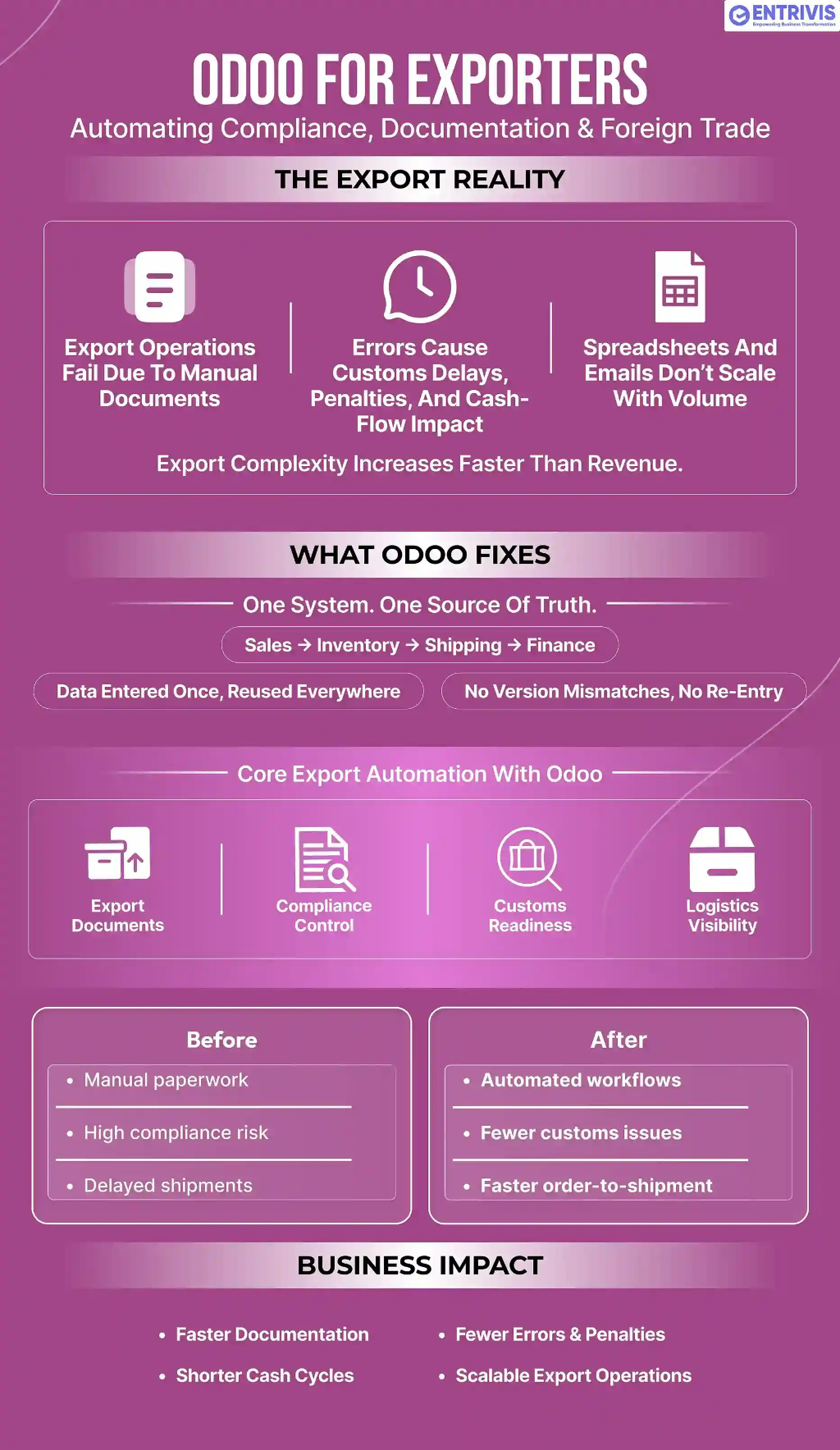
When implemented correctly, Odoo becomes the operational backbone for exporters. It connects sales, inventory, export documentation, compliance, logistics, and finance inside one system. The result is not just automation. It has control over complex export operations at scale.
In this guide, we break down how exporters actually use Odoo to automate compliance, documentation, and foreign trade workflows, and why it is increasingly becoming the ERP of choice for trading businesses worldwide.
Why Export Operations Break Without Automation
Export businesses operate with far more complexity than domestic companies. Every shipment must align documents, regulations, and teams perfectly. When even one element fails, shipments are delayed, customs clearance is blocked, and compliance risk increases.
When export processes are handled manually, problems scale faster than revenue.
Most exporters face the same operational issues:
- Manual preparation of commercial invoices and packing lists for every shipment
- Re-entering the same data across sales, logistics, and accounting, leading to version mismatches
- Errors in HS codes, values, or quantities that result in customs delays or penalties
- Limited visibility into shipment status and document versions
- High dependency on individuals instead of reliable systems
Compliance failures are where the damage becomes expensive. A small documentation error can trigger shipment holds, rejected customs filings, or regulatory penalties. These disruptions delay deliveries, weaken customer trust, and directly impact cash flow.
Coordination adds another layer of pressure. Sales confirm orders, warehouses prepare goods, logistics arrange transport, and finance issues invoices. When these functions operate in disconnected tools, documents fall out of sync, and teams shift from execution to firefighting.
This is why export-focused businesses reach a breaking point as they grow without a structured Odoo business study.
The core issue is not shipment volume alone. It is the absence of a system that connects compliance, documentation, and foreign trade workflows end-to-end.
ERP platforms like Odoo address this by replacing fragmented tools with a single operational backbone.
When implemented by teams experienced in exporter workflows, such as EntrivisTech, Odoo transforms export operations from reactive and fragile into structured and scalable.
Why Odoo Is a Strong Fit for Exporters and Trading Firms
Exporters need more than accounting software. They need a system that keeps sales, inventory, logistics, compliance, and finance aligned, capabilities central to Odoo ERP for complex trade operations.
This is where Odoo fits naturally.
Odoo is built as a modular ERP designed to handle complex, process driven operations. That matters in export businesses, where every shipment can involve different destinations, documents, regulations, and partners.
One system for the full export order to shipment cycle
Odoo connects the entire export workflow inside a single system, including:
- Sales orders
- Inventory movements
- Shipping and logistics workflows
- Export documentation
- Accounting entries
Data is entered once and reused across every step. This eliminates duplication and prevents version conflicts between teams.
When a sales order is confirmed, Odoo can automatically trigger stock reservation, packing preparation, document generation, and invoicing. Exporters stop chasing data across tools and start controlling it from one source of truth.
Designed for approval-heavy and compliance-driven export workflows
Export businesses rely on structured processes. There are approvals, document checks, compliance reviews, and audit requirements at every stage.
Odoo supports this through:
- Multi-level approval flows
- Workflow automation
- Role-based access control
- Complete audit trails
This structure is critical for exporters operating under regulatory scrutiny or serving customers who demand traceability and compliance assurance.
Adapts to country-specific documentation and compliance rules
Export rules vary by destination. Documents, formats, and tax logic change from one market to another.
Odoo allows exporters to configure:
- Custom document templates
- Country-specific tax and duty logic
- Product level compliance attributes
- Regulatory rules by destination
This flexibility allows exporters to ship to multiple regions without forcing manual workarounds or parallel systems.
Lower cost and faster deployment than legacy export ERP systems
Traditional ERP platforms like SAP and Oracle are powerful but often too heavy for exporters, prompting many to review Odoo vs SAP and NetSuite ERP comparisons.
They are expensive to implement, slow to adapt, and difficult for operational teams to use.
Odoo offers:
- Lower implementation and ownership costs
- Faster deployment timelines
- Easier customization for export workflows
- Better usability for day-to-day operations
This makes Odoo a practical choice for growing exporters and trading firms that need control without unnecessary overhead.
Export-focused implementation and ecosystem support
Odoo’s ecosystem includes a wide range of modules and implementation partners. The real value comes when the system is implemented by teams that understand export operations, not just ERP configuration.
Partners like EntrivisTech focus on aligning Odoo with real export workflows. This ensures documentation, compliance, logistics, and accounting processes are designed correctly from the start.
That difference determines whether Odoo becomes just another system or a reliable operational backbone for export growth.
How Odoo Simplifies Export Documentation from Order to Shipment
Export documentation is where most exporters lose time. Commercial invoices, packing lists, proforma invoices, certificates, declarations. All of them are created separately in most companies. That is slow and error prone.
Odoo changes this by linking every document directly to the original sales and inventory data.
Creating Commercial Invoices Without Re-entering Data
In Odoo, the commercial invoice is generated directly from the sales order and delivery data.
That means:
- Customer details are pulled automatically
- Product descriptions and quantities stay consistent
- Prices, currencies, and Incoterms flow in without retyping
- Taxes and duties are calculated based on rules
There is no manual recreation. When the sales order changes, the invoice updates. Exporters avoid mismatches between what was sold and what is invoiced.
Generating Packing Lists That Match What’s Actually Shipped
The packing list is generated from actual stock movements, not from estimates.
Odoo pulls:
- Item quantities from pickings
- Weight and volume from product data
- Carton and pallet details from warehouse configuration
This ensures the packing list matches what is physically shipped, not what was planned. For exporters shipping mixed or consolidated loads, this accuracy is critical.
Handling Proforma Invoices and Export Declarations in One Flow
Proforma invoices are often required for customs, banks, and buyers.
Odoo allows:
- One click generation of proforma invoices
- Consistent formatting
- Version control
- Direct linkage to sales and logistics data
Export declarations can be prepared using the same dataset, reducing duplication and compliance risk.
Producing Certificates and Regulatory Documents Without Manual Work
Many exporters need to produce certificates of origin, quality certificates, and product specific compliance documents.
Odoo uses templates linked to product and customer data. Once configured, these documents are generated automatically with correct values.
No copy paste. No manual edits.
What This Changes for Exporters
Instead of creating documents one by one, exporters work from a single source of truth.
They gain:
- Faster document preparation
- Fewer errors
- Better consistency across all paperwork
- Easier audits and compliance checks
Export documentation stops being a bottleneck and starts becoming a strength.
How Odoo Helps You Stay Compliant Across Export Markets
Export compliance is where exporters face the highest risk. Regulations change frequently, requirements differ by destination, and mistakes are expensive. Delays, penalties, and shipment holds often trace back to compliance gaps rather than logistics issues.
Odoo helps exporters bring structure and control to export compliance, especially when guided by a clear Odoo 19 upgrade checklist.
Managing HS Codes Without Inconsistent Classification
Every export shipment depends on correct HS codes. Incorrect classification is one of the most common causes of customs delays and penalties.
Odoo allows exporters to:
- Maintain a centralized HS code master at the product level
- Link HS codes directly to individual items
- Automatically populate HS codes into invoices, packing lists, and export declarations
This removes manual entry and significantly reduces the risk of inconsistent classification across documents and shipments.
Applying Country-Specific Export Compliance Rules
Different export markets come with different regulatory requirements. Some destinations require additional declarations, while others restrict specific product categories.
Odoo supports country-specific export compliance through:
- Country-based compliance rules on customers
- Product-level compliance flags
- Export restriction and requirement mapping
When an order is created, the system can alert users if a product or destination requires special handling before shipment proceeds.
Checking Sanctioned Countries and Restricted Customers
Exporters must ensure they are not shipping to sanctioned countries or restricted entities. Missing these checks can lead to severe legal and financial consequences.
Odoo can be configured to:
- Flag restricted or sanctioned destinations
- Block transactions based on customer or partner status
- Require approvals for sensitive or regulated exports
This adds a compliance layer directly into day-to-day workflows rather than relying on manual checks.
Maintaining Audit Trails and Compliance Logs
Every change in Odoo is tracked. Product edits, value changes, compliance overrides, and shipment approvals are all logged automatically.
This creates full traceability, making audits, inspections, and internal reviews far easier to manage.
What This Means for Exporters
Export compliance stops being dependent on individual knowledge and becomes part of the system itself. Exporters gain stronger internal control, reduced regulatory exposure, and smoother interactions with customs authorities.
They benefit from:
- Lower compliance and regulatory risk
- Faster customs clearance
- Cleaner, more consistent documentation
- Better audit readiness and accountability
How Odoo Helps You Clear Customs Without Delays or Rejections
Customs is where export operations either move smoothly or break completely. Most delays, rejections, and inspections are caused by poor or inconsistent data rather than the shipment itself. Missing values, mismatched quantities, or incorrect classifications quickly raise red flags.
Odoo helps exporters prepare clean, complete, and compliant data before it ever reaches customs, reducing friction at the clearance stage.
Calculating Export Taxes and Duties Without Manual Lookups
Export taxes and duties depend on multiple variables, and manual calculations often lead to errors or outdated assumptions.
Odoo can be configured to calculate export taxes and duties based on:
- Product category
- Destination country
- HS code mapping
- Applicable trade agreements
These calculations flow directly into invoices and accounting entries, removing the need for manual lookups and reducing financial discrepancies during customs review.
Preparing Customs Documentation from Verified Data
Customs forms require structured, consistent information. Values, quantities, origin, HS codes, weights, and exporter details must align perfectly across documents.
Odoo prepares this data automatically from:
- Sales orders
- Inventory movements
- Product master records
- Customer and consignee details
This creates clean datasets that can be used to generate customs documentation or uploaded directly into customs systems, reducing the likelihood of rejections.
Staying Ready for Different Customs Portals and Systems
Customs systems vary widely by country. Some rely on online portals, others use file uploads, and some support API-based submissions.
Odoo structures export data in a way that is consistent, exportable, and easy to map into external customs systems. This flexibility allows exporters to adapt to different clearance processes without restructuring their internal workflows.
Handling Multi-Country Foreign Trade Without Manual Work
Exporters shipping to multiple regions face different tax rules and formats, making Odoo multi-company consolidation essential.
Odoo supports country-specific tax logic, destination-based compliance rules, and region-specific document formats. This ensures shipments to Europe, the Middle East, Africa, or Asia follow the correct regulatory path automatically, without manual intervention or last-minute fixes.
How Odoo Keeps Shipping, Logistics, and Freight Coordination in Sync
Shipping is where export complexity multiplies. Carriers, freight forwarders, warehouses, and customers all need the same information at the same time. When shipping details live across emails, spreadsheets, and portals, mistakes and delays are almost guaranteed.
Odoo centralizes shipping and logistics information so exporters manage the entire flow from one system instead of chasing updates across teams.
Working with Carriers and Freight Forwarders from One System
Exporters can manage shipping partners directly inside Odoo rather than switching between tools.
This allows them to:
- Generate shipping labels directly from the system
- Book shipments from confirmed deliveries
- Assign carriers or freight forwarders at the order or shipment level
- Store transport details against each delivery
This keeps shipping execution connected to sales and warehouse operations, reducing coordination gaps.
Tracking Shipments in Real Time
Once a shipment is dispatched, Odoo tracks shipment status and carrier updates in real time. Export teams can see where goods are, whether delays are occurring, and when deliveries are expected.
This visibility helps exporters act early on delays instead of reacting after customers escalate issues.
Keeping Shipments and Export Documents Connected
Every shipment in Odoo is directly linked to its commercial invoice, packing list, export documents, and compliance records.
There are no separate folders, no email chains, and no missing paperwork. Anyone reviewing a shipment can instantly access all related documents in one place, improving coordination and audit readiness.
Real Exporter Workflows Using Odoo
This is where Odoo’s value becomes practical. Different exporters use the same system in different ways, depending on what they ship, where they ship, and how complex their compliance requirements are.
Machinery Exporter
Uses Odoo to connect sales orders with production planning, automatically generate export documents, apply HS codes at the product level, and book shipping from one system. Production, compliance, and logistics move together instead of in silos.
FMCG Trading Firm
Uses Odoo to process high volumes of small export orders while applying country-specific compliance rules and automated tax calculations. Documentation and customs data stay consistent even as order volumes increase.
Electronics Exporter
Uses Odoo to manage region-specific regulations across Europe, Africa, and the Middle East. Product compliance, documentation formats, and customs requirements adapt based on destination without manual intervention.
Different industries. Same backbone. One system supporting multiple export models.
The ROI Exporters See After Moving to Odoo
Export automation is not a technology upgrade. It is a financial decision that affects cash flow, risk exposure, and operational efficiency.
Exporters using Odoo typically experience:
- Faster preparation of export documents
- Shorter order-to-shipment cycles
- Fewer documentation and compliance errors
- Faster customs clearance
- Lower regulatory and compliance risk
- Improved working capital flow
When shipments move faster, invoices are issued sooner. When invoices are issued sooner, cash is collected earlier. That improvement compounds across every shipment.
This is operational efficiency translating directly into financial impact.
Common Export Challenges Odoo Removes from Daily Operations
Export operations often struggle not because of demand, but because processes break as volume and complexity increase.
Odoo removes:
- Manual, repetitive export documentation work
- Version confusion across sales, logistics, and finance teams
- Compliance blind spots that surface during customs review
- Shipment delays caused by miscommunication
- Growth without process control
Exporters gain stability alongside speed. Processes become predictable, auditable, and easier to scale.
When Odoo Needs Customization for Real Export Use Cases
Out-of-the-box Odoo covers a wide range of export needs. But export operations are rarely standard, especially once volumes grow, destinations increase, or regulations become more complex.
Customization is often required for:
- Industry-specific export documents and certificates
- Complex or layered compliance rules
- Multi-entity or multi-company trading structures
- Integration with customs brokers, freight systems, or government portals
This is where implementation quality starts to matter more than software features, especially with complex exporter-focused Odoo implementation services.
Teams like EntrivisTech design Odoo around real export workflows, ensuring the system reflects how exporters actually operate rather than forcing generic ERP assumptions onto complex trade processes.
Is Odoo the Right Fit for Your Export Business?
Odoo works best for exporters who deal with operational complexity on a regular basis and benefit from structured Odoo consulting before large-scale adoption. It is a strong fit if you are:
- Handling frequent or recurring export shipments
- Managing high volumes of export documentation
- Experiencing delays caused by customs or compliance issues
- Planning to scale exports without adding process chaos
Odoo may not be the right choice if exports are occasional or if your business operates primarily in domestic markets.
The more complex your export workflows become, the stronger the case for using Odoo as your core operational system.
Final Takeaway
Export operations rarely fail because of lack of demand. They fail when systems are not designed to handle complexity.
Manual processes, scattered data, and disconnected teams create delays, errors, and compliance risk. Over time, these issues slow growth and reduce control.
Odoo addresses this by connecting:
- Sales and order management
- Inventory and warehouse operations
- Export documentation
- Compliance controls
- Shipping and logistics
- Accounting and finance
All within a single operational flow.
For exporters, this is not about adopting new software. It is about changing how the business runs on a daily basis. When Odoo is implemented around real export workflows, exporters gain faster shipments and lower risk, often supported by Odoo system audits.
Exporters who automate effectively compete on speed, reliability, and control. That is the real advantage.
FAQ
How does Odoo automate export documentation?
Odoo creates commercial invoices, packing lists, and proforma invoices directly from sales and inventory data. All details stay consistent and update automatically when orders change, reducing manual work and errors.
How does Odoo reduce customs delays?
Odoo ensures export documents use accurate, matching data for HS codes, values, quantities, and origin details. This reduces inconsistencies that commonly cause customs inspections or shipment holds.
How are HS codes managed in Odoo?
HS codes are stored at the product level and automatically applied across all export documents. This ensures correct classification and lowers the risk of penalties due to incorrect coding.
Can Odoo handle exports to multiple countries?
Yes. Odoo supports country-specific documentation, tax rules, and compliance requirements, allowing exporters to manage multi-country shipments from a single system.
How does Odoo support export compliance and audits?
Odoo logs every change to documents, product data, and approvals. This creates a clear audit trail and helps exporters stay inspection-ready.
Is Odoo suitable for high-volume exporters?
Yes. Odoo scales easily for exporters handling frequent shipments and complex workflows, maintaining control and compliance as volumes grow.