Here's a situation most growing businesses recognise: you've got Odoo running your core operations, but your sales team is on a separate CRM, your eCommerce orders are coming in from a platform Odoo doesn't automatically sync with, your logistics partner has their own tracking portal, and your finance team is manually reconciling data between three different systems every week.
It works. Barely. And the manual effort involved is quietly costing more than anyone wants to admit.
This is exactly the problem Odoo API integration was built to solve. By connecting Odoo to external platforms via its API, businesses can automatically flow data between systems, eliminating manual entry, reducing errors, and making their entire technology stack work as one.
In this article, we'll cover what the Odoo API actually is, the kinds of integrations businesses typically need, real use cases across industries, and what a proper integration project looks like from start to finish.
What Is the Odoo Integration API and How Does It Work?
An API (Application Programming Interface) is essentially a communication channel between software applications. When two systems have APIs, they can exchange data automatically without anyone manually copying information from one platform to another.
Odoo's API is well-documented and flexible. It supports two primary methods: XML-RPC and JSON-RPC. Both allow external systems to read data from Odoo, create or update records, trigger workflows, and retrieve reports all programmatically. More recently, Odoo has also expanded support for REST API patterns, making integrations easier to build with modern web services and platforms.
What this means in practice: an order placed on your Shopify store can automatically create a sales order in Odoo. A payment processed through Stripe can automatically reconcile against the right invoice. A shipment dispatched by your logistics provider can automatically update the delivery status on the customer's order.
None of these requires a human to manually transfer information. The API handles it.
Why Odoo API Integration Matters More Than You Might Think
The honest answer is that most businesses underestimate how much time is lost to manual data transfer until someone actually measures it. A study of business operations consistently finds that a significant portion of staff time in finance, sales, and operations goes toward re-entering data that already exists somewhere else.
Beyond the time cost, manual transfers introduce errors. An invoice was keyed in incorrectly. A stock level that doesn't reflect a recent shipment. A customer record that's out of date because someone forgot to update it across two systems.
Odoo API integration removes the human from that loop. Data moves between systems based on triggers an event happens in one platform, the connected system responds automatically. It's faster, it's more accurate, and it frees your team to focus on work that actually requires human judgment.
For businesses in India managing multiple channels, domestic eCommerce, export orders, third-party logistics, GST compliance, and payment gateways, having these systems connected through Odoo is increasingly the difference between a scalable operation and one that's constantly firefighting.
Common Odoo Integrations That Businesses Actually Use
eCommerce Platform Integration
Connecting Odoo to platforms like Shopify, WooCommerce, Magento, or Amazon is one of the most requested integrations. Orders placed on these platforms flow directly into Odoo as sales orders. Inventory levels in Odoo sync back to the storefront so customers always see accurate stock availability. Fulfillment status updates move from Odoo back to the platform, triggering shipping notifications automatically.
For businesses selling across multiple channels simultaneously, this kind of Odoo API integration is what makes multi-channel selling operationally viable at scale.
Payment Gateway Integration
Odoo connects to payment gateways, including Razorpay, PayPal, Stripe, and various bank payment systems. When a payment is received, it's automatically recorded against the relevant invoice in Odoo, reconciled in the accounting module, and the transaction is logged with all the details the finance team needs for reporting and GST compliance.
Without this integration, someone in accounts manually matches payments to invoices, a time-consuming and error-prone task that happens daily in many businesses.
CRM and Marketing Platform Integration
Some businesses use dedicated CRM platforms like Salesforce, HubSpot, or Zoho alongside Odoo. Through API integration, leads and customer data can sync bidirectionally. New leads captured in a marketing tool appear in Odoo, and customer updates made in Odoo reflect in the CRM without anyone doing it twice.
For companies running active marketing campaigns where lead volume is high, having this data flow automatically keeps sales teams working from accurate, current information.
Logistics and Shipping Integration
Third-party logistics providers, courier APIs, and shipping platforms can connect to Odoo so that dispatch, tracking, and delivery confirmation all happen within the ERP. When an order is confirmed in Odoo, the shipment request goes to the logistics partner automatically. When it's delivered, the status updates back.
This is particularly valuable for businesses managing high order volumes where tracking individual shipments manually is simply not realistic.
Government and Compliance Portals
In India, GST e-invoicing and e-way bill generation are regulatory requirements that need to be triggered at specific points in the sales process. Odoo API integration with the GST portal and NIC e-invoice system automates these invoices, and IRN numbers are received without anyone logging into a government portal separately.
This removes a genuine compliance risk and saves finance teams considerable time during peak periods.
Third-Party Accounting and Reporting Tools
Some businesses use specific reporting or analytics tools, such as Tableau, Power BI, or custom dashboards that need access to Odoo data. Through the Odoo integration API, these tools can pull updated data on a schedule, ensuring reports always reflect current operational reality rather than a last-week export.
How Odoo API Integration Is Built
You don't need to be a developer to understand the basics of how this works, and having a rough picture helps when you're evaluating a project.
Most Odoo API integrations follow a similar pattern. An event triggers in one system a new order, a payment received, or a stock update. That trigger sends data to Odoo (or receives data from Odoo) via an API call. Odoo processes the incoming data and creates or updates the relevant records. Any required response is sent back to the originating system.
The complexity varies. A straightforward one-way sync, say, pushing orders from an eCommerce platform into Odoo, can be relatively simple to build. A bidirectional sync involving inventory levels, customer data, pricing, and fulfillment status across multiple platforms is more involved.
Middleware tools like Zapier, Make (formerly Integromat), or custom-built integration layers are sometimes used to manage the translation between systems, particularly when the external platform's data structure doesn't map neatly to Odoo's.
What matters most is that the integration is built properly from the start with error handling, logging, and the ability to manage exceptions. A poorly built integration that silently drops records or duplicates data causes more problems than the manual process it replaced.
This is why working with a team that has genuine Odoo development experience, not just general developers who happen to read the Odoo API docs, produces significantly better outcomes. The nuances of how Odoo handles records, transactions, and state management are not obvious from documentation alone.
Odoo Integration vs. Native Connectors: What's the Difference?
Odoo has several built-in connectors for commonly used platforms. There are official integrations for WooCommerce, Amazon, and certain payment gateways, for instance. These are configured rather than coded, and they work well for standard use cases.
When businesses have specific requirements that go beyond what the native connector offers, such as custom field mapping, non-standard workflows, or platforms that Odoo doesn't have a built-in connector for, that's when custom Odoo API integration becomes necessary.
Neither approach is inherently better. The right choice depends on what you need the integration to actually do. A good Odoo consulting conversation will quickly clarify which path makes sense for your specific situation and save you from over-engineering something that a native connector handles perfectly well.
What a Proper Odoo Integration Project Looks Like
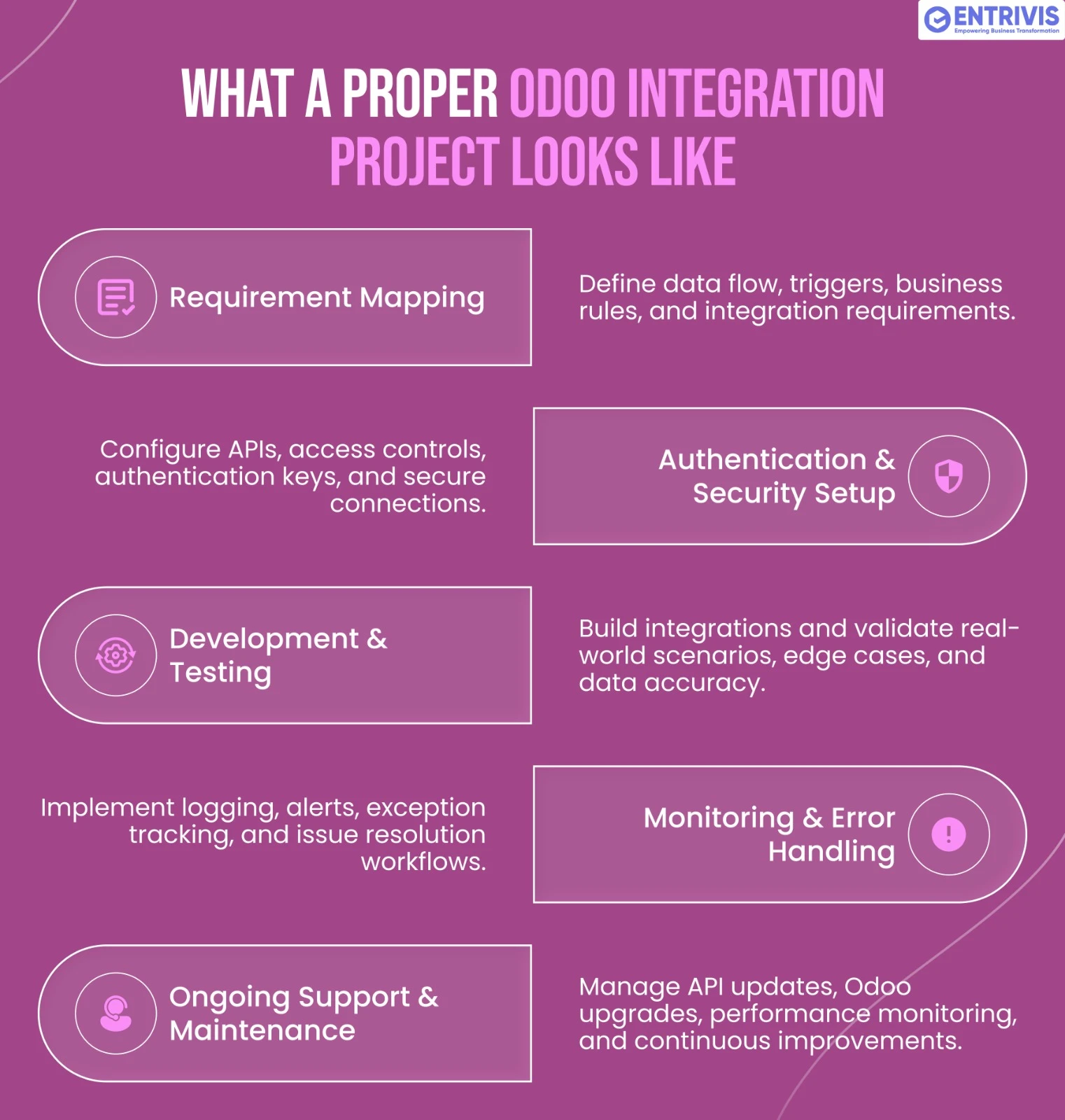
Getting an integration right involves more than writing code. Here's how a well-run project typically unfolds.
Requirement mapping - Before anything is built, it's worth being precise about what data needs to move, in which direction, triggered by what events, and how exceptions should be handled. This sounds obvious, but integration projects that skip this step routinely end up being rebuilt halfway through.
Authentication and security setup - Odoo API connections use API keys and access control rules to manage what external systems can read or modify. Security configuration is not optional an improperly secured API is a genuine vulnerability.
Development and testing - The integration is built and tested against real data scenarios, including edge cases, such as what happens if a product doesn't exist in Odoo yet, what happens if a payment fails, and what happens if the external system sends malformed data.
Monitoring and error handling - A live integration needs logging so that if something breaks, it's immediately visible and diagnosable. Good integrations fail gracefully and alert the right person rather than silently causing data problems.
Ongoing support & Maintenance - External platforms update their APIs. Odoo gets upgraded. Business processes change. An integration that works perfectly today needs maintenance over time. Having access to Odoo support from a team that understands both the integration and the broader ERP setup is valuable here.
If your business is already on an older Odoo version and needs to upgrade before integration work can begin, Odoo migration should be scoped as part of the overall project plan.
Industries Where Odoo API Integration Makes the Biggest Difference
- Retail and eCommerce: Multi-channel selling, inventory sync, payment reconciliation, and fulfillment automation all depend on tight integration between Odoo and external platforms.
- Manufacturing: Connecting Odoo to supplier portals, logistics APIs, and production planning tools creates a supply chain that responds in real time rather than on a reporting lag.
- Healthcare: Connecting Odoo hospital management systems to diagnostic equipment, insurance portals, and government compliance systems improves accuracy and reduces administrative burden significantly.
- Logistics and distribution: Route planning tools, GPS tracking platforms, and third-party carrier APIs can feed directly into Odoo, giving operations teams visibility without manual data collection.
- Financial services: Payment platforms, banking APIs, and regulatory reporting systems all benefit from clean integration with Odoo's accounting and compliance modules.
Frequently Asked Questions About Odoo API Integration
What is Odoo API integration?
It connects Odoo to external platforms so data moves automatically between systems, eliminating manual data entry and reducing errors.
What API methods does Odoo support?
Odoo supports XML-RPC, JSON-RPC, and REST-based API patterns, making it compatible with most modern software platforms.
Can Odoo integrate with Shopify or WooCommerce?
Yes, native connectors exist for both, with custom API integration available for requirements beyond the standard setup.
Is Odoo API integration secure?
Yes, when properly configured with API keys, access control roles, and secure authentication protocols, security setup is a standard part of implementation.
What's the difference between native connectors and custom API integration?
Native connectors handle standard use cases out of the box; custom API integration handles unique requirements or platforms without official connectors.
Can Odoo integrate with Indian payment gateways like Razorpay?
Yes, Razorpay and other Indian gateways can be integrated with Odoo for automated payment recording and invoice reconciliation.
How long does an Odoo integration project take?
Simple integrations can be live in one to two weeks; complex multi-system integrations typically take four to eight weeks, depending on scope.
What happens if the external system's API changes?
The integration needs to be updated to match. This is why ongoing support from an experienced Odoo partner is important.
Do I need to upgrade Odoo before integrating with external tools?
Not always, but older Odoo versions may have API limitations. An audit of your current setup will clarify what's needed.
Can Odoo API integration handle GST e-invoicing in India?
Yes, Odoo can be integrated with the NIC e-invoice portal for automated IRN generation and GST compliance.
One System That Actually Talks to Everything Else
The goal of Odoo API integration isn't technical sophistication for its own sake. It's operational clarity having one source of truth that reflects what's actually happening across your business, without a team of people spending their days moving data between platforms.
When your eCommerce orders, payments, logistics, CRM, and compliance systems all connect cleanly into Odoo, the compounding effect on efficiency is significant. Finance closes faster. Operations respond quicker. Management reports reflect reality. And your team's time goes toward work that actually matters.
If you're evaluating what integrations your Odoo setup needs or starting from scratch and want to get the architecture right from the beginning, Entrivis Tech works with businesses across India on exactly this kind of project. You can also book a free Odoo demo to see how specific integrations work in a live environment before committing to a build.